We’ve introduced a new scheduling feature that gives you more flexibility when booking your Soothe appointment! You can now select a preferred time range instead of a single start time—helping us match you with more available providers.
How It Works
- Select Your Service Details
• Choose your preferred service type, quantity, session length, and provider gender preference.
• Tap Add to Cart to continue. - Choose Your Preferred Date
• Pick the date you’d like to schedule your appointment. - Set Your Preferred Time Range
• After selecting your date, you’ll be prompted to choose your preferred start time.
• You’ll now see a slider that allows you to set a range of time.
• Drag the sliders to reflect:
• The earliest time you’re available to start.
• The latest time you’d like your appointment to finish.
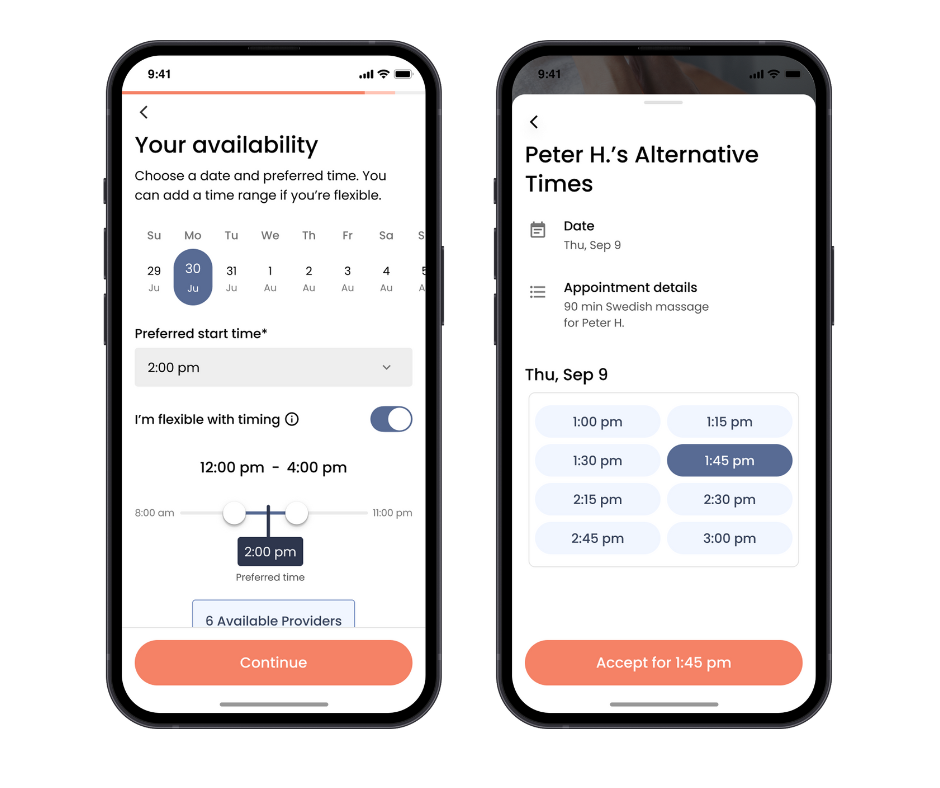
• Your preferred time must fall within the selected time range.
• The time range must allow enough time to complete your chosen service, depending on the session length.
• A wider range increases the chances of being matched with an available provider.
This update makes scheduling easier and helps ensure you’re connected with a provider who fits your preferred time window.